Armable
 › Guides
Quad won’t arm? Here’s why.
Betaflight always knows why it won’t arm. It just tells you in a code. This page translates every code, with the fix.
status. The line Arming disable flags lists every reason. Find each one below. Ignore CLI and MSP: those only appear because the configurator is connected.Where to find the reason
- Setup tab: Betaflight Configurator lists the active Arming Disable Flags on the Setup tab.
- CLI: type
status. The flags are on the line that startsArming disable flags:. - Goggles: with the OSD on, the first flag shows as a warning in the middle of the screen when you try to arm.
- Beeps: many builds beep a pattern when arming is refused. It’s quicker to read the flag than to count beeps.
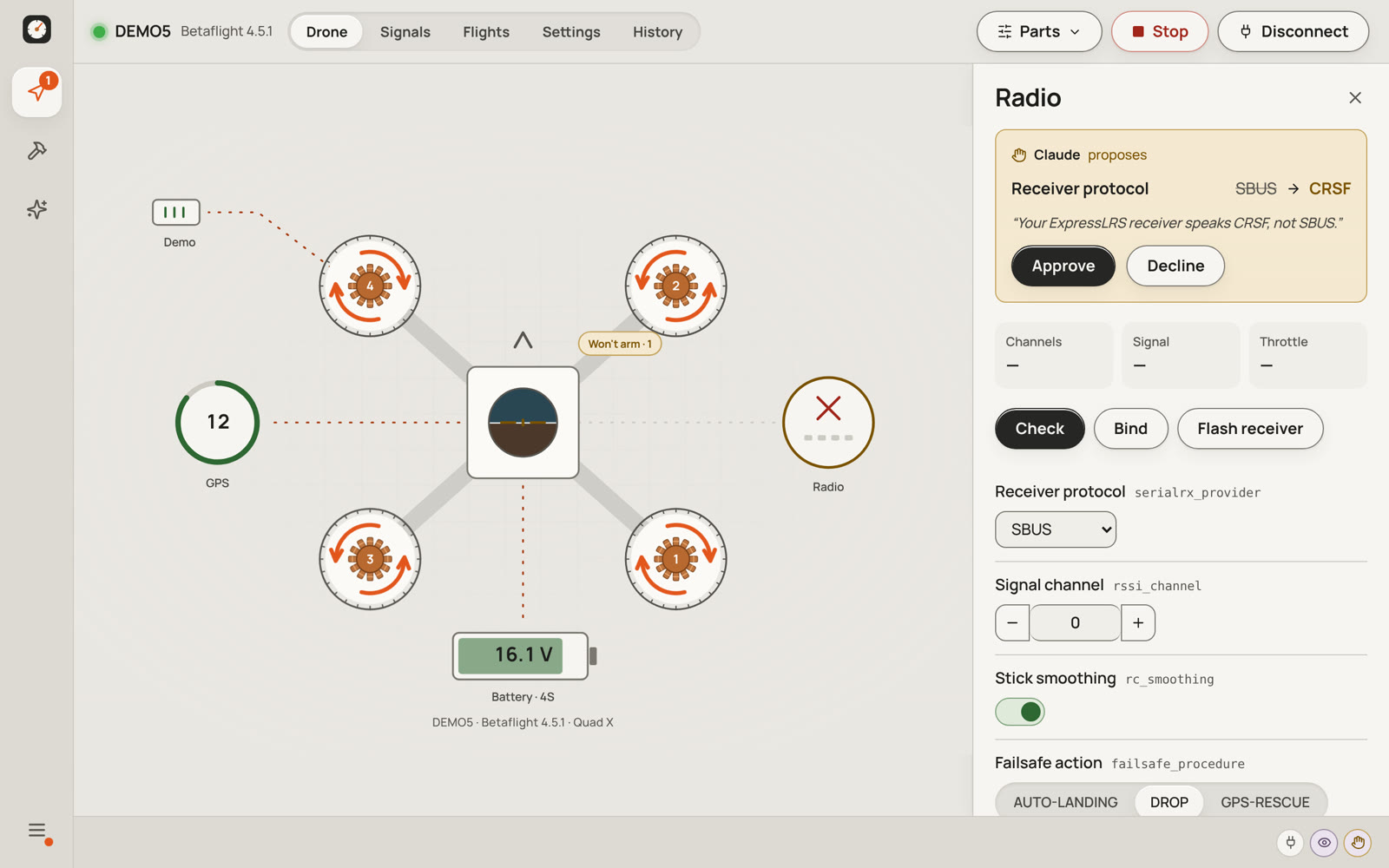
The one that catches most new builds: RXLOSS
RXLOSS means the flight controller hears nothing from your receiver. Everything else can be perfect and it still won’t arm. Check these in order:
- Is the receiver bound? On ExpressLRS the receiver LED goes solid when it’s linked to your radio. A slow blink means it’s waiting for a bind or a matching binding phrase.
- Is the protocol right? ExpressLRS and Crossfire receivers speak CRSF. FrSky and Futaba usually speak SBUS, FlySky IBUS. A new flight controller often ships set to something else. In the CLI:
get serialrx_provider
set serialrx_provider = CRSF
save
- Is Serial RX on the right port? On the Ports tab, turn on Serial RX for the UART your receiver is soldered to, and only that one.
- Are TX and RX swapped? Receiver TX goes to flight controller RX, and receiver RX to flight controller TX.
- Does the receiver get power? Some pads only carry power with the battery plugged in, not on USB alone.
Once the Receiver tab shows the bars moving with your sticks, RXLOSS is gone.
Every Betaflight arming flag
| Flag | What it means | What to do |
|---|---|---|
RXLOSS | No signal from the receiver. | Bind it, set the right protocol (CRSF for ExpressLRS), turn on Serial RX on the right UART. See above. |
FAILSAFE | Failsafe is active: the radio link was lost. | Restore the link, then disarm and arm again. Check your failsafe settings once it’s working. |
NOT_DISARMED | The arm switch was on when the quad powered up. | Flip the arm switch off, then on. |
ARMSWITCH | The arm switch is already on while something else blocked arming. | Fix the other flag, then flip the switch off and on again. |
THROTTLE | Throttle isn’t at the bottom. | Throttle stick all the way down. If it is, check the Receiver tab shows about 1000 there, and calibrate your radio’s endpoints. |
ANGLE | The quad isn’t level enough. The limit is small_angle, 25° by default. | Put it on a level surface. If it’s level, calibrate the accelerometer. |
NO_ACC_CAL | The accelerometer has never been calibrated. | Setup tab, Calibrate Accelerometer, on a level surface. |
CALIB | Sensors are calibrating. | Keep it still for a few seconds. |
BOOTGRACE | Still starting up. | Wait a few seconds after plugging in the battery. |
CLI, MSP | A configurator is connected. | Normal while plugged in. They clear when you unplug. |
RPMFILTER | RPM filtering is on, but the ESCs send no RPM data. | Use ESC firmware with bidirectional DShot (Bluejay, AM32, BLHeli_32), or turn off dshot_bidir. Check motor_poles matches your motors. |
MOTOR_PROTO | No motor protocol is set. | Motors tab: choose DShot300 or DShot600, then save. |
DSHOT_BBANG | DShot bitbang isn’t working on this board. | Try set dshot_bitbang = OFF, or update the firmware. |
RUNAWAY | Runaway takeoff protection tripped: the quad spun up and didn’t behave. | Props off, then check motor order, motor direction and prop direction on the Motors tab. Disarm and arm again. |
CRASH | Crash recovery tripped. | Disarm and arm again. |
BOXFAILSAFE | A switch on your radio has failsafe mode on. | Turn that switch off. |
NOPREARM | A prearm switch is set up and isn’t on. | Flip the prearm switch, then arm. |
CMS | The OSD menu is open. | Exit the menu. |
PARALYZE | Paralyze mode is on, after a crash or a lost model. | Power-cycle the quad. |
GPS | GPS Rescue needs a fix before arming. | Wait for enough satellites, or change the GPS Rescue arming rule. |
RESCUE_SW | The GPS Rescue switch is on. | Turn it off. |
LOAD | The processor is overloaded. | Lower the PID loop rate or turn off features you don’t use. |
REBOOT_REQD | A setting needs a restart. | Unplug and plug back in, or type reboot in the CLI. |
NOGYRO | No gyro was found. | Usually the wrong firmware target for your board. Flash the right one. If that fails, the board may be damaged. |
Flag names can differ slightly between Betaflight versions. When in doubt, the CLI status line is the source of truth.
ArduPilot and PX4: PreArm checks
ArduPilot tells you in words. Messages starting PreArm: appear in Mission Planner’s Messages tab and on the HUD. The common ones on a new build are radio not calibrated, compass not calibrated, accelerometers inconsistent, battery below the failsafe voltage, and no GPS lock in a mode that needs one. Fix what the message names, then try again. PX4 shows the same kind of preflight failure in QGroundControl.
Or let your AI find it
Armable gives Claude, ChatGPT and other assistants the tools to read your flight controller over USB, in the browser. Tell it “my quad won’t arm”. It reads the arming flags and your settings, finds the cause, and proposes the fix on the part it affects. Nothing changes until you approve it. It runs on the AI subscription you already have, with no API key.